You can get a free phone with food stamps, and approval is often the easy part. The step that quietly ends service for many households comes a year later: annual recertification.
Lifeline, the federal program behind these phones, asks every participant to confirm eligibility once a year. Miss that check and the phone can stop working, even if your SNAP case is still active.


This guide is for SNAP households, older adults on benefits, and anyone helping a parent or neighbor sign up. You will see who qualifies, how to apply, and how to keep the phone after year one.
Can You Get a Free Phone With Food Stamps?
Yes. SNAP enrollment qualifies you for Lifeline, the federal program run under the Federal Communications Commission that lowers or covers the cost of phone service for eligible households.
Lifeline is not a new or shady scheme, even if ads call it the "free government phone." The Universal Service Administrative Company (USAC) runs the verification side, and approved carriers supply the phones and service plans.
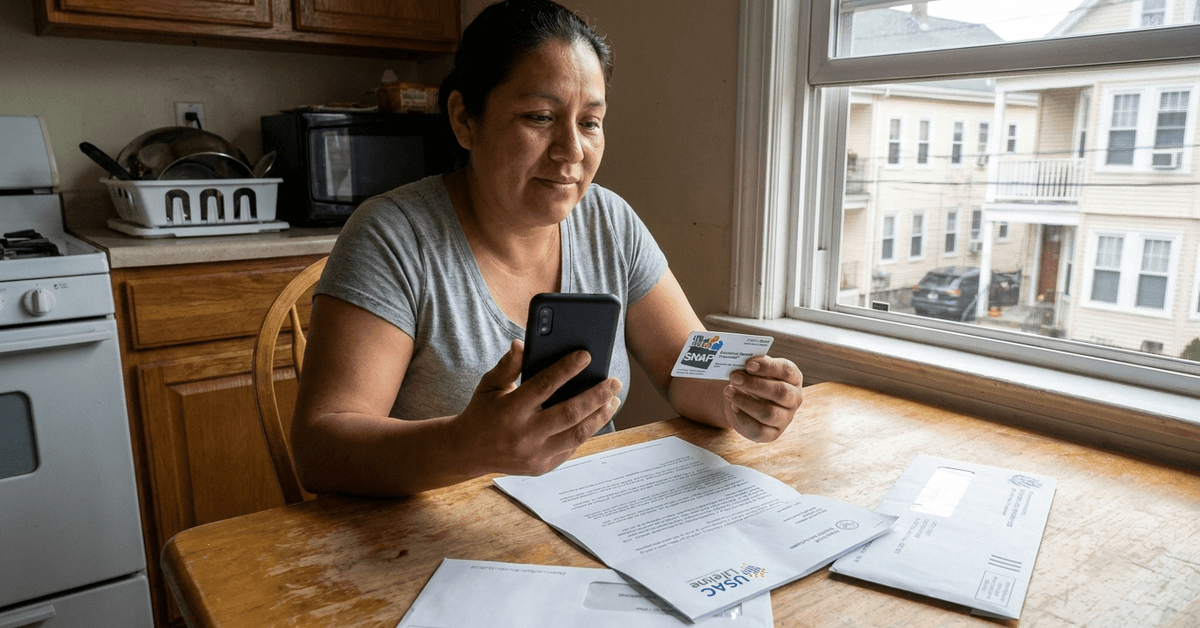
What the phone itself usually looks like
Most Lifeline phones are entry-level Android smartphones, and some carriers still hand out flip phones. Plans come with a monthly cap on talk, text, and data, so the device will not replace a premium unlimited plan.
Who Qualifies for a Lifeline Phone Besides SNAP Users?
SNAP is the fastest route, but it is one of several doors. Lifeline eligibility also opens through other federal benefits or through household income alone.
The FCC income rule sets the line at 135% of the federal poverty guidelines, adjusted for family size. A household under that figure can qualify without being enrolled in any benefit program at all.
Other programs that count
Medicaid, Supplemental Security Income, Federal Public Housing Assistance, and the Veterans Pension and Survivors Benefit all qualify. Some states add their own programs, so check your state's list on the official Lifeline site.
The one-per-household limit
Lifeline allows one benefit per household, covering either a phone plan or an internet discount. Three qualifying adults under one roof still share a single Lifeline benefit, which surprises extended families more than anyone else.
How to Apply for a Free Phone With Food Stamps
The application starts with proving you qualify, then picking a carrier. The official sign-up channel is the National Verifier, a USAC portal that checks your eligibility against government records.
I think the smartest first move is going straight to the National Verifier run by USAC, even though most people start at a carrier's booth or ad. The common advice says let the provider handle everything because it is faster.
My reason for disagreeing: Lifeline rules allow one benefit per household, and applying yourself shows you exactly what was submitted under your name and address.
Documents to gather first
Have these ready to avoid a stalled review:
- A recent SNAP award letter or other proof of program participation
- A government-issued ID to confirm identity
- Proof of address that matches your application
- Your Social Security number, which USAC uses to block duplicate accounts
Three ways to start the application
Each route ends at the same eligibility check, but they suit different people.
| Route | Best suited for | Watch out for |
|---|---|---|
| National Verifier online | People with internet and scanned documents | Uploads must be clear and recent |
| Approved Lifeline carrier | People who want a phone handed over fast | Read what you sign before sharing your SSN |
| Mail-in application | People without reliable internet | Expect a longer wait |
Online is usually quickest if you can photograph your documents clearly.
Which Lifeline Provider Should You Pick?
Pick a carrier that is approved in your state and has solid coverage where you live and work. Assurance Wireless, Safelink Wireless, and Q Link Wireless are familiar names, and each offers slightly different devices and plans.
What to compare between carriers
Skip the shiny phone photos and compare the parts you will feel every month:
- Monthly data cap, since heavy users may need a paid add-on
- Network coverage at your home, job, and clinic
- Device type, smartphone or flip phone
- How the carrier sends recertification reminders
My honest preference is choosing the carrier with the better data allowance over the nicer device, because Lifeline service plans include limited data each month. A great phone with no data left by the 20th helps nobody.
How Long Does It Take to Get the Phone?
Approval can come the same day when records match, but extra document requests add time. Once approved, most carriers mail the phone or SIM card to your address, and a few offer pickup locations.
Activating your phone
Activation is usually a quick call or a few setup screens on the device. Do it as soon as the box arrives, since an unused benefit can raise questions with the carrier.
Keeping Your Lifeline Phone After the First Year
Annual recertification is required for every Lifeline participant, and missing it can end service. You can complete it online or by mail after the notice arrives.
The part that trips people up is having two separate clocks. SNAP has its own renewal cycle, and Lifeline recertification runs on a different schedule, so finishing one does not count for the other.
When your situation changes
If you lose SNAP and no other qualifying program or income test applies, you must update your Lifeline status. Telling the carrier early avoids a sudden shutoff and possible penalties for staying enrolled while ineligible.
A simple habit helps here: put your Lifeline approval date in your phone calendar with a reminder set a month ahead. Your future self will thank you, possibly from a working phone.
Is It Safe to Share Your Information for Lifeline?
Lifeline applications collect your SSN, home address, and proof of benefits, and USAC manages the process under federal privacy and anti-fraud oversight. That data confirms eligibility and blocks duplicate accounts.
Stick to official government sites and approved carriers, and double-check web addresses before typing anything.
The FCC's Lifeline consumer page explains the program rules, and the official Lifeline Support site lists eligibility details and approved companies by state.
You must also confirm that everything you submit is accurate. Misrepresentation can cost you the benefit and lead to further penalties, so read each form slowly.
Questions People Ask About Free Phones With Food Stamps
These come up a lot from people applying for themselves or for a family member.
- Q: Do I need to send extra paperwork if I'm already on SNAP?
Often not much. The National Verifier can confirm SNAP enrollment through records, though a recent award letter is handy if the system asks for proof. - Q: Can I keep my current phone instead of getting a new one?
Some carriers let you bring your own device and just send a SIM card. Ask before you apply, since policies differ by company. - Q: Can my roommate and I both get Lifeline?
The limit is one benefit per household. If you share a home, decide together who holds it before anyone applies. - Q: What if my data runs out before the month ends?
Lifeline plans include a capped amount of data. Heavy users may need a paid add-on from the carrier, which Lifeline does not cover. - Q: Will I get a reminder before recertification is due?
Notices usually arrive ahead of time. Do not depend on them alone, especially if your mailing address recently changed.
Conclusion
A free phone with food stamps is within reach for most SNAP households through the federal Lifeline program. Applying through the National Verifier keeps you aware of exactly what goes out under your name.
Comparing carriers on data caps and coverage matters more than picking the flashiest phone available. Set a recertification reminder today, because keeping the phone next year depends on that one date.